

Interactive chart - coming soon
Quiet Hours are schedule-based. Set a start and end time for calmer overnight behavior.
Display, LED, and sound are separate controls. Screen brightness, light-ring level, and volume can be adjusted independently.
Use the device or app. The same practical settings are available from the on-device settings flow and the app.
If a sound still surprises you. The Tuesday self-clean cycle is separate from Quiet Hours behavior and is normally brief.
Related reading
Understand the reading
-
Reading the dashboard
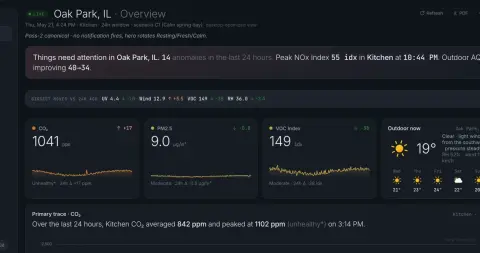
What "elevated," "spike," "trend," "baseline," and "anomaly" mean. The vocabulary the AI uses.
-
The Tuesday-morning fan sound
A brief Tuesday fan sound is normally the SEN66 sensor self-clean cycle.
-
Set up your Terrestream
A short first-run path: power the sensor, pair it, connect Wi-Fi, claim it to your account, then place it where the room air can circulate.
Find the source
-
Pair with the app
Use the 6-digit passkey on the device screen to create an encrypted Bluetooth pairing, then finish the claim flow in the app.
-
Connect to Wi-Fi
Terrestream uses 2.4 GHz Wi-Fi. You can configure it from the app or use the temporary setup network when no Wi-Fi is saved.
-
Factory reset your device
Factory reset clears saved device configuration, claim, and account-linking information so the sensor can be paired again.
Take action
-
Before you sell or give away your device
Factory reset the sensor before another person receives it.
-
Compare indoor air-quality monitors
A fair, sourced buyer guide to Terrestream, AirGradient ONE, Ruuvi Air, Awair Element, Airthings View Plus, Aranet4 HOME, Kaiterra Sensedge Mini, and IQAir AirVisual Pro.
-
Terrestream vs Awair Element
Awair Element is a compact five-factor monitor; Terrestream adds broader particulate sizing, NOx, pressure, light, and deeper interpretation.